What is RadSec? Configuring RadSec (RADIUS Over TLS)
Key Takeaways
- RadSec improves RADIUS security by using TLS encryption to protect authentication and accounting data in transit.
- Configuring RadSec requires a trusted CA and certificates on the RADIUS server and network infrastructure, along with the appropriate RADIUS settings for RadSec communication.
- To secure a RadSec deployment, use TLS 1.2 or later, trusted certificates, strong cipher suites, and proper certificate validation. Regular certificate management also helps maintain secure RADIUS communication.
What Is RadSec? Configuring RadSec (RADIUS Over TLS)
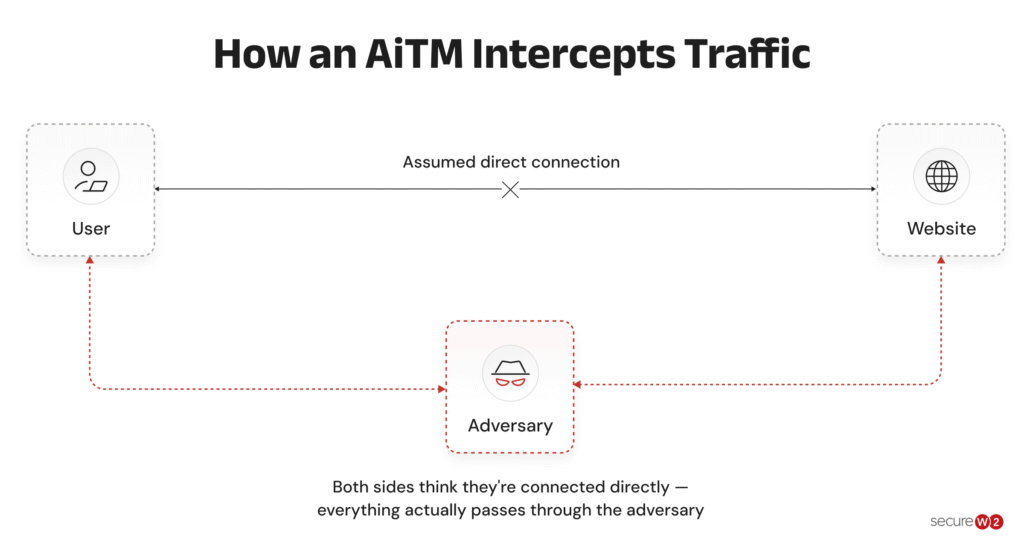
RADIUS is widely used for network authentication, but traditional RADIUS relies on User Datagram Protocol (UDP) and uses Message-Digest Algorithm 5, or MD5-based mechanisms that provide limited protection for RADIUS traffic. This can expose RADIUS communication to security risks, including packet tampering and Adversary-in-the-Middle (AiTM) attacks.
RadSec, or RADIUS over Transport Layer Security (TLS), addresses these limitations by protecting RADIUS communication with TLS encryption.
In this guide, we’ll explain
- What RadSec is
- How RadSec works
- The differences between RadSec and RADIUS
- The benefits of using RadSec, including its configuration options
What Is RadSec?
RadSec is a secure transport method that protects RADIUS communication by carrying standard RADIUS packets over a TLS-encrypted TCP connection.
Defined in RFC 6614, RadSec uses certificate-based authentication and TLS encryption to secure communication between RADIUS endpoints while preserving existing RADIUS authentication, authorization, and accounting (AAA) functionality.
Enabling RADIUS communication over TLS increases the security of authentication carried out across the cloud network.
Success: When configured, RadSec safely transmits authentication and accounting data between the Instant AP and the RadSec server.
Learn more about how RadSec works in this video.
Type of Data Encryption Used by RadSec
RadSec uses TLS encryption to protect RADIUS data in transit.
TLS combines asymmetric and symmetric cryptography to establish and maintain a secure connection between the RADIUS client and RadSec server.
Symmetric Key Cryptography
Symmetric cryptography uses the same secret key to encrypt and decrypt data.
In RadSec, TLS negotiates symmetric session keys during the TLS handshake. The keys are then used to encrypt the RADIUS traffic transmitted between the client and server.
Symmetric encryption provides efficient protection for the ongoing exchange of authentication and accounting data.
Asymmetric Key Cryptography
Asymmetric cryptography uses a public and private key pair.
During the TLS handshake, RadSec uses digital certificates and asymmetric cryptography to authenticate the communicating parties and securely establish the session. Once the handshake is complete, the connection uses the negotiated symmetric keys to encrypt the RADIUS data.
Together, asymmetric and symmetric cryptography allow RadSec to provide secure authentication, encryption, and protection against interception and tampering while carrying standard RADIUS traffic over TLS.
How RadSec Works
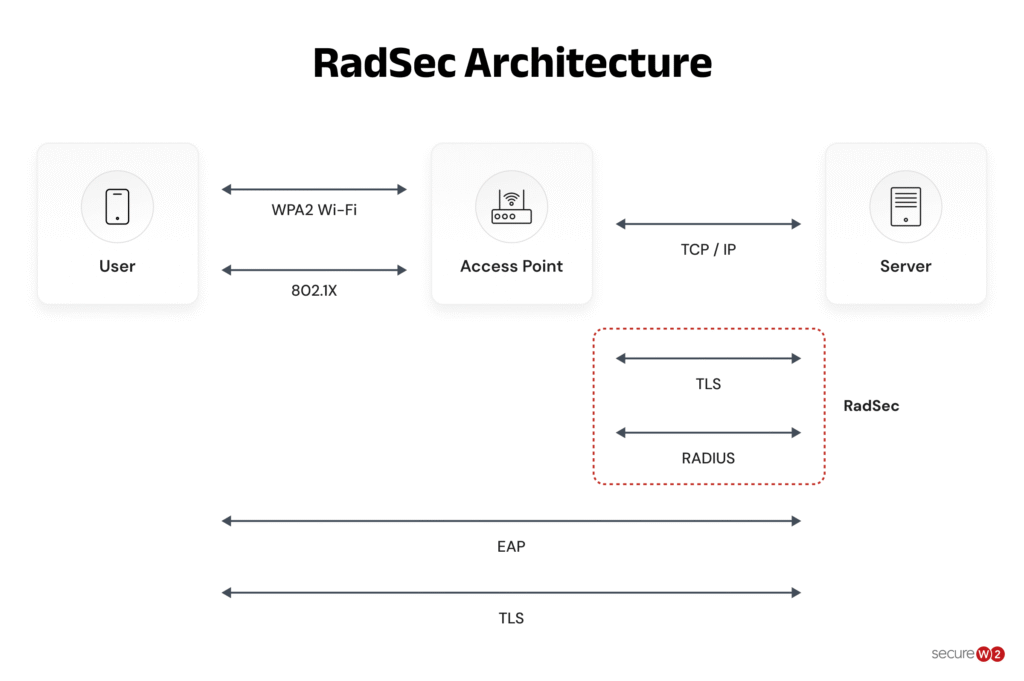
RadSec changes how RADIUS messages move across networks, wrapping the entire packet in an encrypted TLS session over TCP. This is how it works:
- RadSec uses TCP and TLS to carry standard RADIUS payloads inside an encrypted tunnel versus cleartext over UDP.
- TLS relies on certificates and negotiated symmetric keys from the handshake to authenticate peers and encrypt traffic between them.
- RadSec typically uses TCP port 2083 for RADIUS over TLS connections instead of traditional RADIUS ports 1812 (authentication) and 1813 (accounting).
- The use of TCP gives RadSec built-in reliability features like retransmission and ordered delivery, helping reduce packet loss and performance issues often seen with RADIUS/UDP over the internet.
- Existing foundational RADIUS semantics stay the same, letting organizations upgrade their transport layer without completely redesigning their AAA logic.
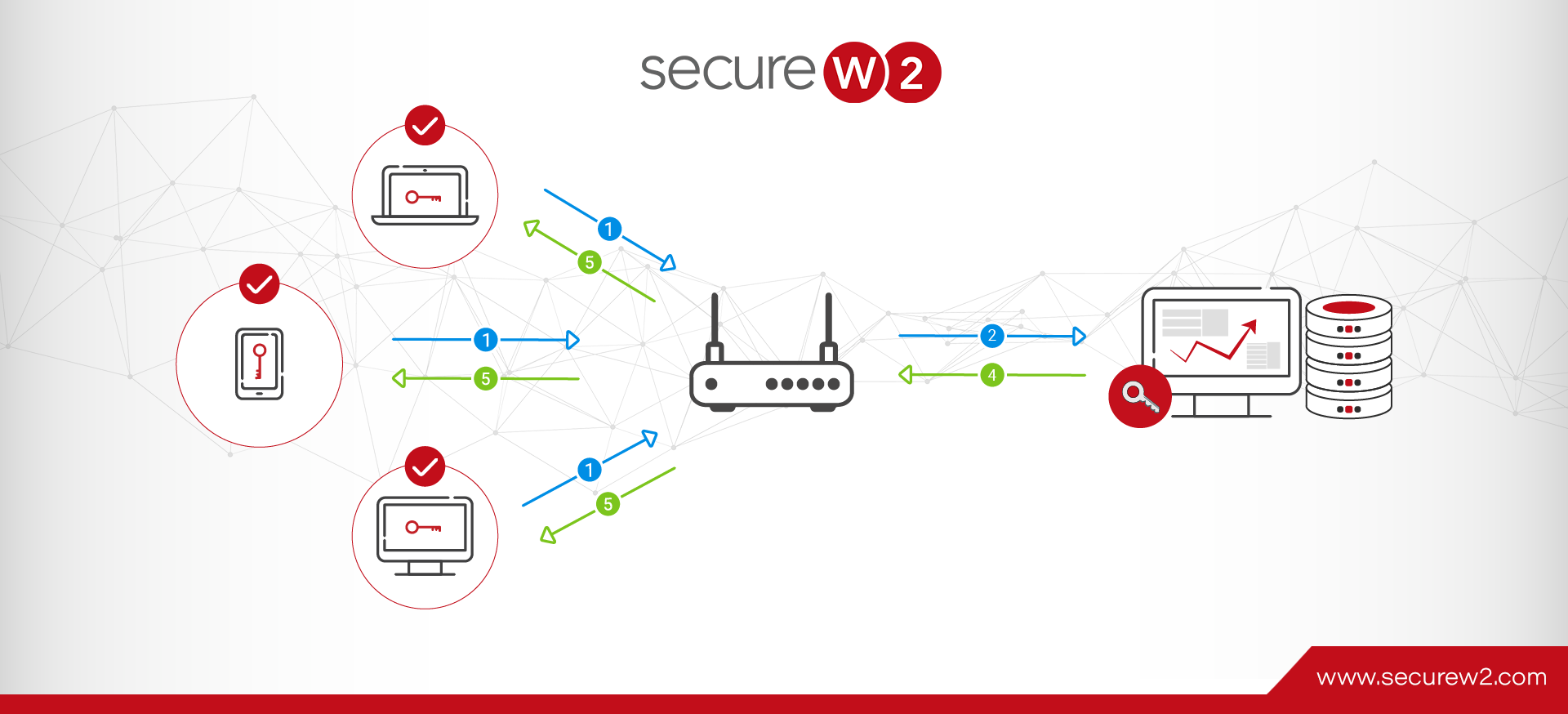
The following diagram illustrates how RadSec secures traffic with TLS.
How to Configure RadSec (RADIUS Over TLS)
The RadSec configuration process can be broken down into a few high-level steps: configuring the RadSec destination and the TLS Connection. You need to specify the RADIUS server transferring the data and define the RadSec destination so the RADIUS traffic can be directed there. Here’s how to do that:
- Import the server CA certificate that issues server certificates.
- You can cross-import CAs if you have two separate CAs issuing server and client certificates.
- This process will establish Server Certificate Validation.
- Configure the destination hostname (server name).
- Optional: Specify the port you want to use if the default RadSec port (2083) isn’t ideal.
- Specify the TLS parameters.
- TLS dictates how data will be transferred through RadSec.
- The best practice is to use the EAP-TLS protocol (SecureW2 JoinNow is pre-built for EAP-TLS).
RadSec vs. RADIUS: Key Differences
RADIUS relies on UDP to transfer information, while RadSec relies on TCP (Transmission Control Protocol).
Info: UDP is considered less secure than TCP because messages are sent without a requirement for setting up communication channels.
UDP is acceptable if packet loss is not a concern, but it makes RADIUS communication more vulnerable because important data packets could be lost.
Attackers can exploit this vulnerability to infiltrate your network and harvest credentials, as the diagram below illustrates.
While both protocols support AAA services, the biggest differences between traditional RADIUS and RadSec come down to transport security, reliability, and suitability for cloud-connected environments.
This comparison table highlights the main differences between RADIUS and RadSec.
Feature | Traditional RADIUS | RadSec (RADIUS over TLS) |
|---|---|---|
Transport Protocol | UDP | TCP + TLS |
Default Ports | 1812 / 1813 | 2083 |
Encryption | Limited protection using shared secrets | Full TLS encryption |
Authentication Method | Shared secret | Certificate-based authentication |
Protection Against MITM Attacks | Limited | Strong |
Reliability | No guaranteed packet delivery | Ordered and reliable delivery |
Internet Traversal | Less secure across public networks | Designed for secure internet transport |
Certificate Support | Not required | Required |
Best Use Cases | Small internal networks | Cloud, roaming, federated authentication |
Common Deployments | Legacy enterprise networks | eduroam, OpenRoaming, cloud RADIUS |
How Roaming Breaks Traditional RADIUS
Traditional RADIUS relies on clients communicating with known server IPs using pre-configured shared secrets.
This is perfect for a static LAN, but it quickly breaks once requests start to cross multiple proxies and domains, as is common with modern traffic flows to and from a public internet connection.
In today’s roaming federations like eduroam and OpenRoaming, authentication often travels through proxies controlled by others, making certificate-driven mutual TLS a safer and more scalable strategy for establishing trust across these more dynamic paths.
Key Benefits of RadSec vs. RADIUS
Beyond solving roaming and federation challenges, RadSec offers other key advantages over RADIUS/UDP.
- End-to-end encryption for all RADIUS data: RadSec encapsulates the entire RADIUS exchange within TLS tunneling, so credentials and metadata like outer identity, NAS IP and calling station ID are encrypted on the wire instead of exposed in plaintext.
- Robust integrity and anti-tampering features: TLS ensures packets cannot be altered in transit without being detected, reducing the risk of spoofing, forgery and Adversary-in-the-Middle (AiTM) attacks that target legacy RADIUS/UDP environments.
- Mutual certificate-based authentication: Instead of relying on shared secrets, RadSec uses X.509 certificates from a trusted CA to mutually authenticate client and server during the TLS handshake.
- Reliable delivery over untrusted networks: Running over TCP gives RadSec ordered, predictable delivery of authentication and accounting records, which are critical when RADIUS traffic traverses lossy or congested WAN paths.
- Minimal impact on existing policies: RadSec preserves standard RADIUS semantics of identities, attributes, and policies. This means organizations can upgrade reliability and security at the transport layer without additional rework of AAA logic.
Since RadSec is only as strong as the PKI underneath it, certificate management must become part of your core network hygiene. Automating certificate issuance, renewal, and revocation for RadSec endpoints preserves the new, stronger protections without driving outages or trust gaps when certs expire.
Does RadSec Have Any Vulnerabilities?
Although RadSec improves RADIUS security by protecting communication with TLS, it is not completely free from security risks.
Proper configuration, certificate management, and ongoing maintenance are important for keeping a RadSec deployment secure.
- Certificate management: RadSec depends on certificates to establish trust between endpoints. Expired, invalid, or incorrectly configured certificates can affect secure communication.
- Weak cipher suites: Using outdated or weak cryptographic algorithms can reduce the protection provided by TLS.
- Misconfiguration: Incorrect TLS, certificate, or trust settings can introduce security weaknesses or prevent RadSec connections from working correctly.
- Denial-of-service (DoS) attacks: RadSec endpoints can still be targeted by attempts to overwhelm the service and disrupt RADIUS communication.
- Certificate Authority (CA) trust: Incorrectly configured or compromised trust relationships can affect the ability of RadSec endpoints to verify each other’s certificates.
- Private key protection: Private keys used with TLS certificates must be securely protected. If a key is compromised, the security of the associated connection can be undermined.
- Software and implementation issues: Vulnerabilities in the software implementing RadSec can introduce security risks, making timely updates and patches important.
- Interoperability: Different RadSec implementations may have differences in supported TLS settings, certificate requirements, or configuration, which can create security or connectivity issues if not properly addressed.
Best Practices For Secure RadSec Deployments
Deploying RadSec is an important step, but you still need to treat the TLS layer as critical security infrastructure. This means hardening it with the same attention paid to the rest of your PKI infrastructure.
- Enforce modern TLS versions and strong cipher suites: Prioritize TLS 1.2+ (ideally 1.3 where possible) and disable weak or legacy cipher suites to avoid downgrades and known cryptographic weaknesses.
- Strictly validate servers and hostnames: Ensure RadSec clients validate the server certificate chain, check revocation status where possible, and verify that the certificate’s name matches the expected RadSec endpoint.
- Automate certificate lifecycle management: Upgrade issuance, renewal, and revocation operations from manual to automated to prevent outages or trust gaps from expired certificates, all while reducing IT workload.
- Monitor and log RadSec activity: Turn on detailed logging for all RadSec connections and alert on repeated TLS handshake failures, certificate errors, or unusual patterns that indicate possible misconfiguration or attack.
- Protect private keys: Securely store and restrict access to the private keys associated with RadSec certificates. Limit access to authorized systems and administrators and rotate keys when necessary.
- Keep RadSec implementations updated: Keep the software and systems running RadSec up to date with current security patches to reduce exposure to known vulnerabilities.
Move Beyond On-Premises RADIUS With a Cloud-Native Authentication Stack
On-premises RADIUS servers carry hefty maintenance costs and an increased risk of hardware failure.
Our Cloud RADIUS eliminates operational overhead while strengthening security.
It authenticates users and devices using live security signals from your identity provider, MDM, and EDR/XDR platforms, so access decisions reflect current device posture, not a stale snapshot from last week’s sync.
The result is authentication that scales with the organization, not against it. Teams that have replaced legacy RADIUS with SecureW2 Cloud RADIUS consistently report faster authentication times, fewer outages, and best-in-class uptime, and the option for 99.999% availability.
If your current RADIUS setup is creating friction for IT or leaving security gaps, there is a better path. See SecureW2 Cloud RADIUS in action.
Frequently Asked Questions
What is the difference between RADIUS and RadSec?
Traditional RADIUS typically uses UDP to transport authentication and accounting messages, while RadSec (RADIUS over TLS) uses TLS to secure RADIUS communication. RadSec adds encryption and certificate-based protection to the RADIUS transport while retaining the core RADIUS functionality.
Which is better, RADIUS or LDAP?
RADIUS and LDAP serve different purposes. RADIUS is primarily used for network access authentication and authorization, while LDAP is a directory protocol used to store and retrieve identity information. RADIUS can use an LDAP directory as an identity source, so they can work together rather than being direct alternatives.
What is RADIUS over TLS?
RADIUS over TLS, commonly known as RadSec, protects RADIUS communication by transporting RADIUS messages through a TLS-secured connection. This provides encryption and certificate-based authentication between RADIUS endpoints.
Is RADIUS still used today?
Yes. RADIUS is still widely used for network access authentication, including Wi-Fi, VPN, and other network access services. RadSec provides a way to secure RADIUS communication with TLS where stronger transport protection is required.
What port does RADIUS over TLS use?
RadSec commonly uses TCP port 2083 for RADIUS over TLS, rather than the traditional RADIUS UDP ports 1812 and 1813.
Does Windows NPS support RadSec?
Windows Network Policy Server (NPS) is commonly used as a RADIUS server for network authentication, but RadSec support depends on the specific NPS version, configuration, and deployment architecture. Verify the supported RADIUS-over-TLS capabilities before planning a Windows NPS-based RadSec deployment.