A Remote Authentication Dial-In User Service (RADIUS) server, or RADIUS authentication server, is a type of authentication that functions like a virtual security guard. Every time a user or device attempts to access a protected resource, they need to prove they have the right to access that resource through the process of authentication. This means that RADIUS could be key for your organization’s network authentication.
RADIUS authentication servers are increasingly used in industries and organizations internationally due to their triple function of authentication, authorization and accounting.
What Is a RADIUS Server?
A Remote Authentication Dial-In User Service (RADIUS) server is a network access server (NAS) that grants or denies user and device access to networks. Before responding to an access request, the server cross-references credentials or certificates against a trusted directory of approved users and their access levels.
The easiest way to imagine where a RADIUS server fits into your network is to picture a bouncer at the door to a club. When someone tries to access the network, it confirms they should have access first by checking their credentials or certificate through the RADIUS authentication process.
Sometimes, a RADIUS authentication server is also referred to as an AAA server, which stands for Authentication, Authorization, and Accounting.
How Does RADIUS Server Authentication and Authorization Work?
RADIUS authentication works by using a client-server model where a Network Access Server (NAS), such as a Wi-Fi access point, VPN gateway, router, or switch, acts as the RADIUS client and forwards user credentials to a central RADIUS server for verification. The entire process follows the AAA framework and typically runs over User Datagram Protocol (UDP), using Port 1812 for authentication and Port 1813 for accounting.
Imagining a RADIUS authentication server as a guard at a door gives you a high-level overview of how RADIUS authentication works. However, reality is a bit more complicated and there are different steps involved in the process depending on the authentication protocol your network supports.
RADIUS server authentication typically works through one of three common wireless authentication protocols:
- Extensible Authentication Protocol-Transport Layer Security (EAP-TLS)
- Protected Extensible Authentication Protocol-Microsoft Challenge Handshake Authentication Protocol version 2 (PEAP-MSCHAPv2)
- Extensible Authentication Protocol-Tunneled Transport Layer Security/Password Authentication Protocol (EAP-TTLS/PAP)
WPA2 & WPA3 Enterprise Common Protocols | Level of Encryption | Authentication Speed | Directory Support | Credentials |
EAP-TLS | Public–Private Key Cryptography | Fast – 12 steps | Universal | Passwordless |
PEAP-MSCHAPv2 | Bad encryption (MD4, compromised since 1995) | Slow – 22 steps | Active directory | Passwords |
EAP-TTLS/PAP | Vulnerable – Protects credentials by passing the PAP authentication exchange through an encrypted TLS tunnel established between the client and the RADIUS server | Slowest – 25 steps | Active directory | Passwords |
No matter which protocol you use, RADIUS networking pairs authentication and authorization together for streamlined but secure access. Authentication determines whether someone should be allowed access to the remote network. The level of authorization someone has determines exactly how much access they have to specific resources on the network.
For example, someone working in an HR department for an organization may have access to different information and applications than someone working in the finance department. This means that they have varied levels of authorization.
However, each protocol dictates a different set of standards for the authentication and authorization process, including what the user/device provides to verify their identity. You can break down how RADIUS authentication works with these protocols into two different categories: authentication via credentials (username/password) and authentication via digital certificates (passwordless).
Credential-Based RADIUS Authentication and Authorization
PEAP-MSCHAPv2 and EAP-TTLS/PAP are both credential-based authentication protocols. Since a RADIUS server doesn’t store login information, it needs a directory of some kind to check the credentials and policies related to those credentials at the time of authentication.
All communication between the client and server is protected with a shared security key or password that is never transmitted over the network, maintaining privacy and security.
Generally, credential-based authentication and authorization follow these steps:
- User sends authentication request: The end-user/device submits an authentication request to the NAS with their username and encrypted password.
- NAS delivers access request to RADIUS server: The NAS transmits this request to the designated RADIUS server.
- Server analyzes request: The RADIUS authentication server receives the request, reads the shared secret, and verifies that the user’s username and password exist in the user database — commonly an Identity Provider (IdP).
- RADIUS server responds: Based on the results of the verification, the RADIUS returns an ACCESS_ACCEPT to authenticate the user, an ACCESS_CHALLENGE to request more details, or an ACCESS_REJECT message to the NAS.
- (If ACCESS_ACCEPT) Client receives authorization: Once authenticated, the client receives the ACCESS_ACCEPT message authorizing connection. This message contains a shared secret and Filter ID attribute authorizing access to a specific RADIUS group (a collection of users with the same access controls, e.g., sales, finance, HR).
- (If ACCESS_ACCEPT) User gains access: With their access request authenticated and authorized, the user can access the client network.
This may seem like a complex process, but it all happens quickly; authentication and authorization are nearly instantaneous.
Certificate-Based RADIUS Authentication and Authorization
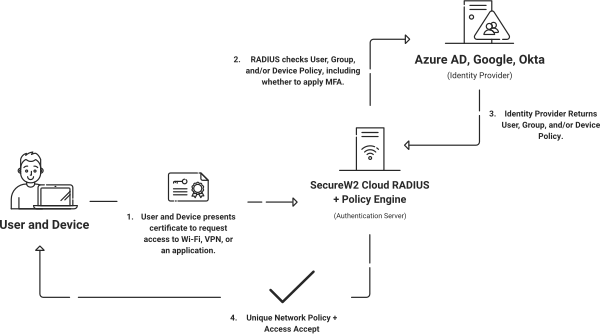
RADIUS authentication with certificates (EAP-TLS) looks different. Digital certificates contain quite a bit more information in their templates than a typical username/password does, giving the RADIUS server and any administrator reviewing records such as RADIUS event logs a lot more context.
The process looks like this:
- NAS sends the certificate: The device presents its certificate to NAS, which forwards the request to the RADIUS authentication server.
- Server runs expiration check: The RADIUS networking server starts by checking that the certificate isn’t expired.
- Server cross-checks CRL: Next, the RADIUS server checks the Certificate Revocation List (CRL) to determine that the certificate hasn’t been revoked.
- Server authenticates and authorizes user: If the certificate hasn’t been revoked, the RADIUS server can confirm the user’s status in your directory and grant access. But if the certificate has been revoked, the server will reject the request.
How Does RADIUS Server Accounting Work?
RADIUS clients send user and device data to the server for storage and accounting. Network administrators can use RADIUS accounting features with or without authentication and authorization. Admins can use this data for audits, reporting, billing, and network monitoring or other security management activities.
There are three main steps to RADIUS accounting:
- Accounting Start: When an authorized user accesses the network, the RADIUS client sends a RADIUS accounting request packet, also known as an Accounting Start, to the RADIUS server. The packet includes the user’s network address, MAC address, access point, credentials, and unique session identifier. On receipt of the Start packet, the RADIUS server sends an Accounting Response.
- Interim Updates: As the session continues, the client may send new accounting request packets with updated information about data usage, session duration, and more. The server sends responses accordingly.
- Accounting Stop: When a user logs off or their access is revoked, the RADIUS client sends a final accounting request packet called the Accounting Stop. It shares the session duration, data accessed, bytes, starting and interim packets, and why the user disconnected. The server confirms receipt of the Accounting Stop packet and stores the details for future use.
RADIUS accounting helps network administrators monitor individual usage and overall trends, improve forecasting and resource allocation, bill users for data usage, and spot unusual network activity to maintain security.
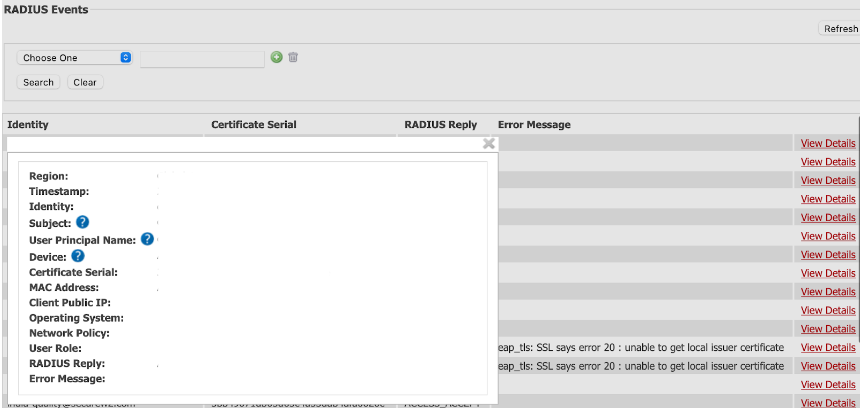
As an example, let’s look at the information contained in a SecureW2 JoinNow Cloud RADIUS event log. Cloud RADIUS event logs contain extremely detailed information tied to the device’s certificate, such as:
- The region the device authenticated from
- The time of authentication
- The MAC address of the device
Administrators can also use this information to troubleshoot when there are connectivity issues.
What Is a RADIUS Server Used For?
Network administrators use AAA RADIUS servers for diverse needs, including:
- General network access: Before granting access, RADIUS authentication servers verify a user’s identity by confirming their credentials or certificate along with their unique access levels.
- Intranets: Company intranets need ironclad verification to prevent unauthorized access. RADIUS servers authenticate the user and device, authorize or reject access, and keep accounts of user activity.
- Virtual private networks (VPNs): RADIUS servers can regulate local network usage and secure remote access to VPNs, maintaining sensitive network security.
- Wireless networks (Wi-Fi): Private Wi-Fi network protection is another application for RADIUS authentication servers. It works with popular authentication methods such as the 802.1X protocol. Most private Wi-Fi requires credentials, but the shared secret between server and client keeps those credentials secure.
- Internet service providers (ISPs): ISPs for both home and corporate use rely on RADIUS networking to regulate wired and wireless network security.
- Network Accounting: Not all authentication methods provide accounting services, but RADIUS does. This lets network administrators monitor, record, track, and identify anomalies in network usage. It’s also ideal for usage-based billing.
Types of RADIUS Servers
There are two main types, or modes, of RADIUS protocol servers:
- Synchronous authentication mode: A user requests access; the client and server communicate to authenticate the user’s credentials and either grant access or reject the request.
- Asynchronous authentication mode: A user requests access; RADIUS security authenticates the credentials and responds with a challenge for the user — usually a code, as in multi-factor authentication (MFA). Based on the user’s response to the challenge, the server will approve or reject the access request.
Admins can configure RADIUS authentication servers to either mode; the choice just depends on your needs.
Synchronous authentication is sufficient for most use cases. Asynchronous authentication can provide an additional layer of security for industries with highly sensitive data and strict regulatory requirements, such as finance and healthcare.
Components of RADIUS Authentication
RADIUS authentication requires a few things to work:
- A RADIUS server, which receives user connection requests.
- A directory of user/device information, also called an Identity Provider or IdP, for the RADIUS to reference.
- A RADIUS client, which sends access requests to the server.
RADIUS networking servers are so efficient at controlling network access because they don’t perform too many tasks at once. RADIUS protocol focuses on authentication, authorization, and accounting – not storing user information in advance. This is why it needs a directory to reference once it receives an access request. Commonly, an Identity Provider such as Active Directory, Azure AD/Entra ID, Google, or Okta is used to verify the information behind each access request.
What Is the RADIUS Protocol?
RADIUS, or Remote Authentication Dial-In User Service, is the networking protocol that powers centralized Authentication, Authorization, and Accounting (AAA) for network access.
It defines the client-server communication standard using UDP Port 1812 for authentication and authorization, and Port 1813 for accounting.
The protocol also specifies packet formats, attributes, shared-secret security, and response codes (such as ACCESS-ACCEPT or ACCESS-REJECT). These elements allow a Network Access Server (NAS) to securely query a RADIUS server for user validation and policy enforcement.
A Brief History of the RADIUS Protocol
Livingston Enterprises developed the RADIUS protocol concept in the first half of the 1990s, during the internet’s early days. Merit Network, a nonprofit organization that provides networking services to various entities, requested a solution that condensed their authentication, authorization, and accounting systems.
In response, Livingston Enterprises drafted the first version of the RADIUS protocol or Remote Authentication Dial-In User Service.
Initially, the RADIUS protocol only supported credential-based authentication, but it has changed over time to support authentication methods such as digital certificates. This keeps it relevant within the scope of the ever-changing cybersecurity industry. Today, it is a part of IEEE 802 and Internet Engineering Task Force (IETF) standards.
What Are the Benefits and Challenges of RADIUS Server Security?
Benefits of RADIUS
- Reliable authentication, authorization and accounting (AAA): AAA is the primary function of RADIUS; it’s a trusted all-in-one solution for network security management.
- Continuous trust verification: RADIUS server logins require consistent authentication and authorization. If admins revoke authorization at any time, unauthorized users will immediately lose access.
- Centralized authentication management: RADIUS and the I it references provide one clear source for credential and certificate management.
- Role-based access controls: Personalize access levels by department or role to keep sensitive data secure.
- Scalability: RADIUS is extremely flexible, scaling with you as your organization grows. It can accommodate heavy traffic without failure.
Challenges of RADIUS
- Potential on-premises costs: Unless you choose a cloud RADIUS server, you need to purchase, manage, and maintain on-premises hardware.
- Complex network infrastructure: One of the benefits of RADIUS is that it’s highly customizable. However, due to this RADIUS authentication server configuration can be difficult to set up and maintain on your own.
- Security vulnerabilities: As with any network access protocol, RADIUS requires regular monitoring and updates to avoid cybersecurity threats.
- Security expertise: To set up RADIUS security, you need skilled IT experts. This requires experienced in-house personnel and/or a trusted service provider to configure RADIUS server settings and access levels.
You can schedule a free demo to see how the experts at SecureW2 can make Cloud RADIUS security easy for your team.
What Should You Choose: On-Premises RADIUS Server or Cloud-Based RADIUS Server?
Some organizations want to add a RADIUS server to their security, but are uncertain whether they should build and manage their own on-premises or use a cloud-based, managed RADIUS authentication server such as Cloud RADIUS. There are advantages to either method and it’s important to consider these before making your decision.
Pros and Cons of On-Premises RADIUS Server
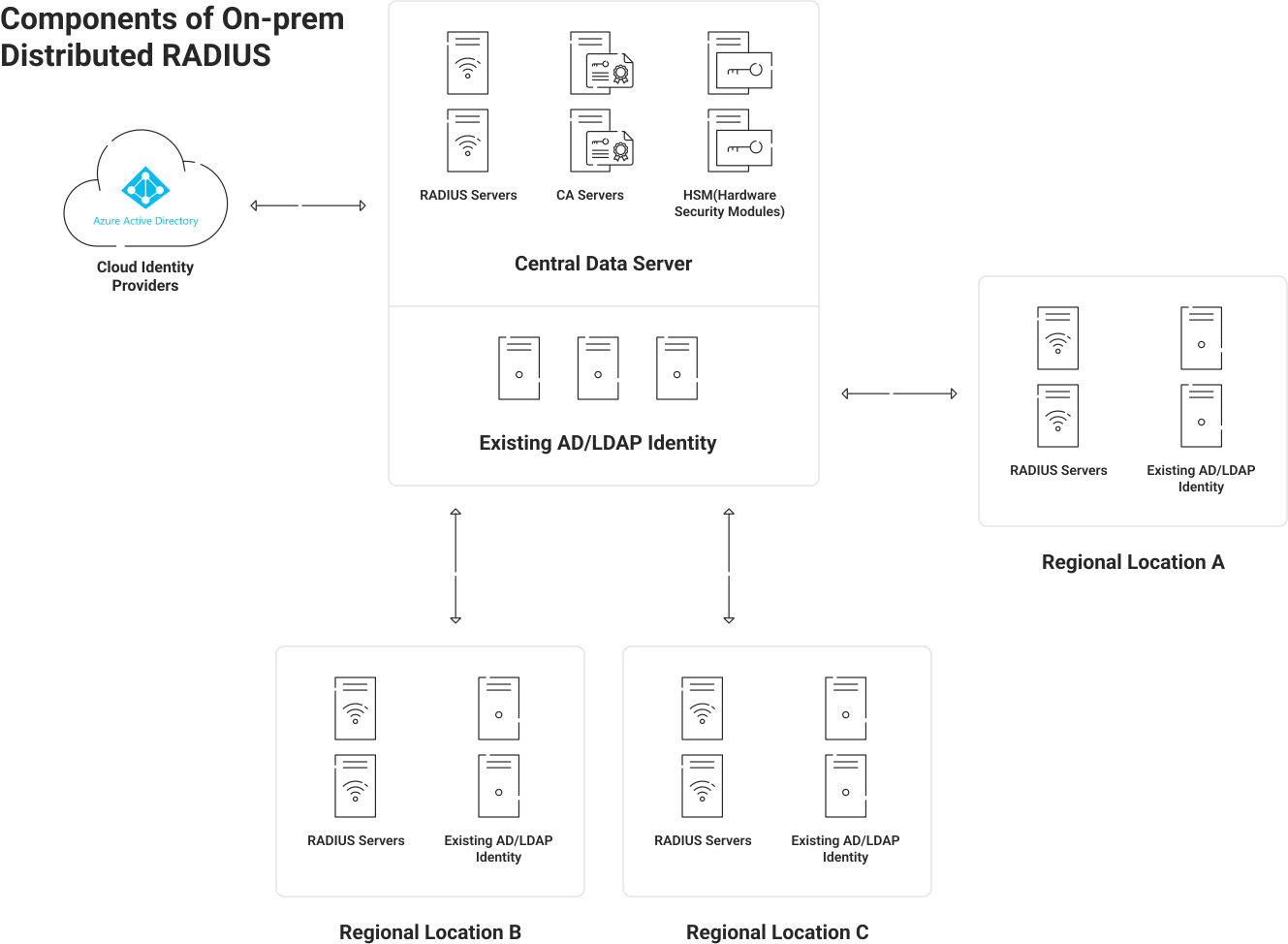
The main benefit of an on-premises RADIUS server is that your organization has total control over everything that goes into it. If your organization has a dedicated IT team with RADIUS server experience, this is an enticing benefit.
However, there are many drawbacks to consider when building and managing your own RADIUS architecture.
- Hardware costs: Although you could theoretically put RADIUS on any server with sufficient space, many organizations build a dedicated server for this purpose. The cost increases exponentially if you have multiple office locations, as each location will need its own dedicated RADIUS server.
- Maintenance costs: Regular patches and maintenance need to be performed, which requires time and effort from your IT team. The time and effort grow if they have little experience with RADIUS servers. Misconfiguration, which is possible with less experienced teams, can cause major security issues and setbacks.
- Physical security: The server will need a dedicated, secure space in your office building. Additionally, localized disasters may temporarily take your RADIUS down. Fires, earthquakes, and other types of inclement weather can potentially damage your RADIUS server or take it offline temporarily. This can prevent employees from connecting to your network, dropping productivity and increasing frustrations.
Pros and Cons of Cloud-Based Managed RADIUS Service
A cloud-based and managed RADIUS authentication server counters all the points we mentioned in the previous section.
- No hardware or maintenance costs: You don’t need to build the RADIUS yourself or manage maintenance and patching. All of those things are done for you, allowing you to deploy the security of RADIUS authentication quickly.
- Infinite scalability: Since it’s native to the cloud, you don’t need to duplicate the RADIUS at every single office location. This makes solutions like Cloud RADIUS infinitely scalable. With server locations globally available, Cloud RADIUS also enjoys low latency — faster authentication leads to faster connections.
- High Availability: Cloud RADIUS removes the burden of physically securing an on-premises server and provides automatic redundancy for uninterrupted service during disasters or failures.
How to Integrate Cloud RADIUS With Your Identity Infrastructure?
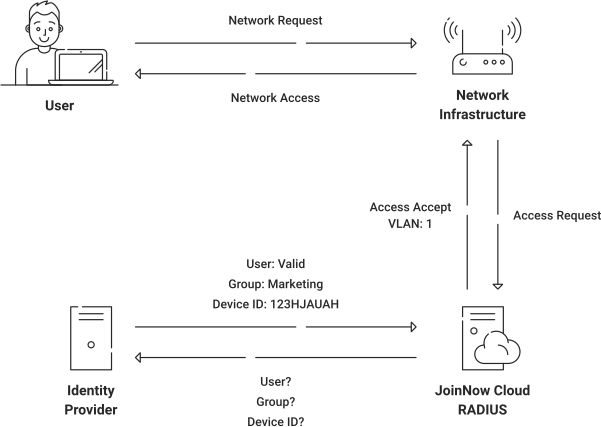
Cloud RADIUS was designed to integrate with your current infrastructure, so you don’t have to make any major changes or upgrades. It can integrate with all major Security Assertion Markup Language (SAML) Identity Providers and even Microsoft’s Active Directory.
The configuration process for this varies depending on which IdP you use. However, if you’re doing EAP-TLS, the general infrastructure you need to set up is as follows:
- Tie your public key infrastructure (PKI) to your IdP.
- Tie the Cloud RADIUS infrastructure to your IdP.
- Tie your device management platform to the SecureW2 PKI if you are leveraging our PKI services.
We have more detailed RADIUS configuration guides that provide the configuration steps. If you’d like to learn more about integrating Cloud RADIUS with Azure AD/Entra ID, Okta, or Google Workspace, you can click on any of the links provided.
How to Deploy RADIUS Security in Minutes With Cloud RADIUS?
Deploying RADIUS security doesn’t need to be difficult, costly, or tough to maintain. With comprehensive Cloud RADIUS features, you can leverage the strength of RADIUS server authentication quickly at all your locations.
Plus, because it’s a managed service, you can rely on the expertise of our knowledgeable engineers without hiring a whole new team. We have experience integrating with all kinds of infrastructure and deploying as quickly as you need us to. We’re an award-winning platform for a reason.
If you’d like to learn more about how flexible Cloud RADIUS can be, reach out to us today for a free demo.
FAQs About RADIUS Servers
Are RADIUS Servers Still Used?
Yes, RADIUS servers are still widely used in 2026. They remain a foundational component of network access control in enterprises, educational institutions, ISPs, and government organizations worldwide.
Despite being a protocol that dates back to the early 1990s, RADIUS has proven remarkably resilient. Its longevity stems from deep integration across network infrastructure: routers, switches, firewalls, VPN gateways, and wireless access points all support RADIUS natively. Replacing it would require significant infrastructure overhauls that most organizations have little incentive to undertake.
What Are the Key Scenarios Where RADIUS Authentication Is Used?
RADIUS authentication remains the dominant method for controlling network-level access in several key scenarios:
- Corporate VPNs: RADIUS is the standard backend authentication service for most enterprise VPN solutions.
- WPA2/WPA3 Enterprise Wi-Fi: The 802.1X authentication standard that secures enterprise wireless networks relies directly on RADIUS.
- Network Device Administration: IT teams use RADIUS (often alongside TACACS+) to authenticate administrators logging into routers, switches and firewalls.
- ISP and Telecom Networks: Internet service providers use RADIUS for subscriber authentication and session accounting at a massive scale.
Why Hasn’t RADIUS Been Replaced?
While newer protocols like OAuth 2.0 and SAML have taken over application-layer authentication, no single successor has displaced RADIUS at the network layer. Its AAA framework (authentication, authorization and accounting) is deeply embedded in the IEEE 802.1X standard, and most modern network hardware ships with RADIUS support out of the box.
RADIUS is evolving. RadSec (RADIUS over TLS) addresses one of the oldest criticisms of the protocol, its reliance on UDP and weak transport security, by tunneling RADIUS traffic over encrypted TLS connections, extending its relevance into modern continuous trust architectures.
What Is the Difference Between RADIUS Clients and RADIUS Servers?
A RADIUS client is the device transmitting access request messages to the RADIUS server. It’s important to note that the RADIUS client is not the end-user’s individual device. The term RADIUS client specifically refers to a network access server, which can mean wireless access points, VPNs, or an 802.1X switch.
One way to imagine a RADIUS client and RADIUS authentication server is to picture the way mail is sent. You, as the writer of a letter, are a user. The mail truck is the RADIUS client, delivering your letter to the post office. The post office is the RADIUS server, verifying the letter is formatted appropriately (authenticated).
How Does RADIUS Work in Wi-Fi Authentication?
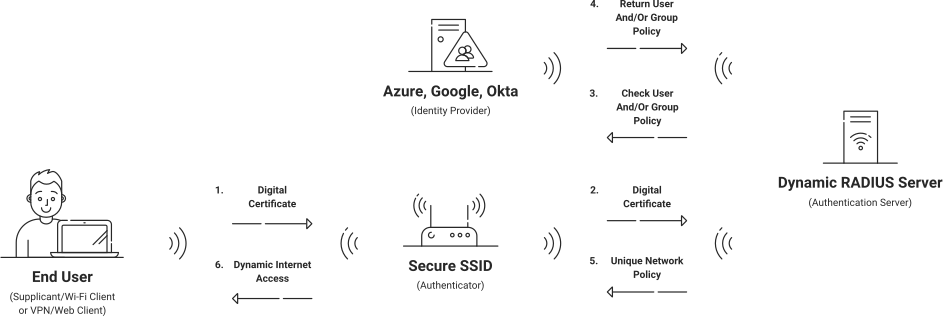
In Wi-Fi networks using enterprise security (WPA2-Enterprise or WPA3-Enterprise), RADIUS provides centralized authentication, authorization and accounting (AAA) through the 802.1X framework. When a user or device attempts to connect:
- The wireless client (called the supplicant) communicates with the Wi-Fi access point (the authenticator or Network Access Server/NAS) using Extensible Authentication Protocol over LAN (EAPoL).
- The access point forwards the authentication details, encapsulated in EAP messages, to the RADIUS server via Access-Request packets, protected by a shared secret.
- The RADIUS server verifies the credentials or certificates against a directory, often using an EAP method like EAP-TLS (certificate-based and highly secure with mutual authentication), PEAP-MSCHAPv2 (credential-based with a server-side TLS tunnel), or others.
- Upon success, the server replies with an Access-Accept packet containing authorization attributes (such as VLAN assignment, role-based access, session timeout, or bandwidth limits). The access point then opens the port for full network access. If authentication fails, it sends Access-Reject.
We generally recommend EAP-TLS over credential-based methods such as PEAP-MSCHAPv2 because it uses digital certificates for both client and server validation. This eliminates password risks, enables true mutual authentication (the device confirms it’s connecting to a legitimate RADIUS server), and provides stronger protection against credential theft or rogue networks.
Can RADIUS Server Work With VPN Authentication?
Organizations with a remote workforce often use VPNs to allow employees to securely access company resources from outside the office. The process is similar to what happens with Wi-Fi authentication with some caveats.
If you plan to use certificate-based RADIUS authentication with your VPN, you’ll need to verify your VPN supports both certificate-based authentication and RADIUS authentication.
Even if your VPN doesn’t technically support EAP-TLS, Cloud RADIUS can still often integrate with multi-factor authentication (MFA) for more secure VPN authentication. In that case, we can use an Azure MFA license with Cloud RADIUS to perform a lookup with a SAML Identity Provider such as Azure AD/Entra ID. This will trigger the Microsoft Authenticator App to authenticate the session.
Alternatively, many VPNs support certificate-based authentication but do not necessarily require the addition of RADIUS. In that case, you can leverage the SecureW2 Managed PKI and integrate it with your firewalls instead.
What's the Difference Between RADIUS Servers vs. Active Directory?
A RADIUS server processes requests for network access authentication, authorization and accounting. The server compares user credentials or certificates against directories called Identity Providers (IdPs) to determine whether to accept or reject the access request.
Active Directory (AD) isn’t a server — it’s actually an IdP that stores user information. So, a RADIUS server may communicate with Active Directory (or another IdP) to verify user credentials before granting access.
What's the Difference Between RADIUS vs. LDAP?
RADIUS stands for Remote Authentication Dial-in User Service. It’s an authentication method commonly used for network access across wired, Wi-Fi, and VPN connections. Depending on your network architecture, it can be on-premises or cloud based. RADIUS can authenticate, authorize, and provide accounting support. RADIUS verifies access through credentials or digital certificates using User Datagram Protocol (UDP), encrypting passwords with shared secrets.
LDAP stands for Lightweight Directory Access Protocol. It’s also an authentication protocol, but with downsides: for example, unsecured credentials and no server certificate validation. It’s typically limited to on-premises implementation. LDAP can authorize and authenticate, but there’s no accounting. LDAP verifies access through credentials only (not certificates) using Transport Layer Security (TLS).
When it comes to LDAP vs. RADIUS, RADIUS provides more comprehensive, secure verification.
What's the Difference Between RADIUS vs. TACACS+?
RADIUS is an open-standard network access authentication protocol using UDP as its transport layer protocol. It combines all authentication, authorization, and accounting (AAA) processes together, supports 802.1X port-based access control, and encrypts passwords when passing information between client and server.
TACACS+ (Terminal Access Controller Access-Control System Plus) is an open standard protocol used for centralized AAA for networking devices, using Transmission Control Protocol (TCP) as its transport layer. It separates AAA into distinct processes. While RADIUS is the designated protocol for 802.1X port-based authentication, TACACS+ is primarily used for device administration (CLI access), though it can coexist with 802.1X environments for administrative tasks. However, it encrypts all packets (not just passwords) when passing information between client and server.
When choosing TACACS+ vs. RADIUS, TACACS+ is often the preferred choice for heavily regulated industries (finance, security, defense), while RADIUS is best for organizations seeking simple integration, configuration for multiple devices and device types, and scalability.
What's the Difference Between RADIUS vs. SAML?
Both SAML and RADIUS are widely used authentication and authorization protocols, but they serve distinct use cases and operate in fundamentally different ways. Understanding the differences helps you choose the right protocol for your identity and access management (IAM) strategy.
What Is SAML?
Security Assertion Markup Language (SAML) is an XML-based open standard designed for exchanging authentication and authorization data between an Identity Provider (IdP) and a Service Provider (SP). SAML is primarily used for web-based Single Sign-On (SSO). It allows users to authenticate once and gain access to multiple applications, which makes it a foundational element of modern enterprise identity federation.
SAML vs. RADIUS: Side-by-Side Comparison
| Feature | SAML | RADIUS |
|---|
| Primary Use Case | Web app SSO / federation | Network access control |
| Protocol Type | XML over HTTP/HTTPS | UDP-based client-server |
| Authentication Scope | Application-layer | Network-layer |
| Common Deployments | Cloud apps, SaaS, enterprise SSO | VPNs, Wi-Fi, firewalls |
| MFA Support | Yes (via IdP) | Supported (via proxy/extensions) |
| Standards Body | OASIS | IETF (RFC 2865) |
When to Use SAML vs. RADIUS
Choose SAML when your goal is federated identity and seamless SSO across cloud-based or web applications. It integrates natively with IdPs such as Google Workspace, Microsoft Entra ID (formerly Azure AD) and Okta.
Choose RADIUS when you need to authenticate users at the network perimeter — such as enforcing access policies for remote workers connecting over VPN or employees joining a corporate Wi-Fi network. For organizations moving toward cloud-native infrastructure, Cloud RADIUS provides a way to bridge these network requirements with modern cloud IdPs.
In many enterprise environments, IT teams deploy SAML and RADIUS together. SAML handles application-layer authentication while RADIUS secures network-level access. This combination creates a “continuous trust” model, providing layered, defense-in-depth security across the entire infrastructure.